

Accessing, Printing, and Sharing Your Police Check Certificate #
Yes — you can easily view, print, or download a copy of your completed Worker Checks Police Check Certificate directly from your personal portal.
🖨️ How to Print or Download Your Certificate #
- Log in to your Worker Checks personal portal.
- Navigate to the My Checks section.
- Open your completed check.
- Click the View PDF icon in the top-right corner of your certificate.
- Choose your printer or select “Save as PDF” to download a digital copy.
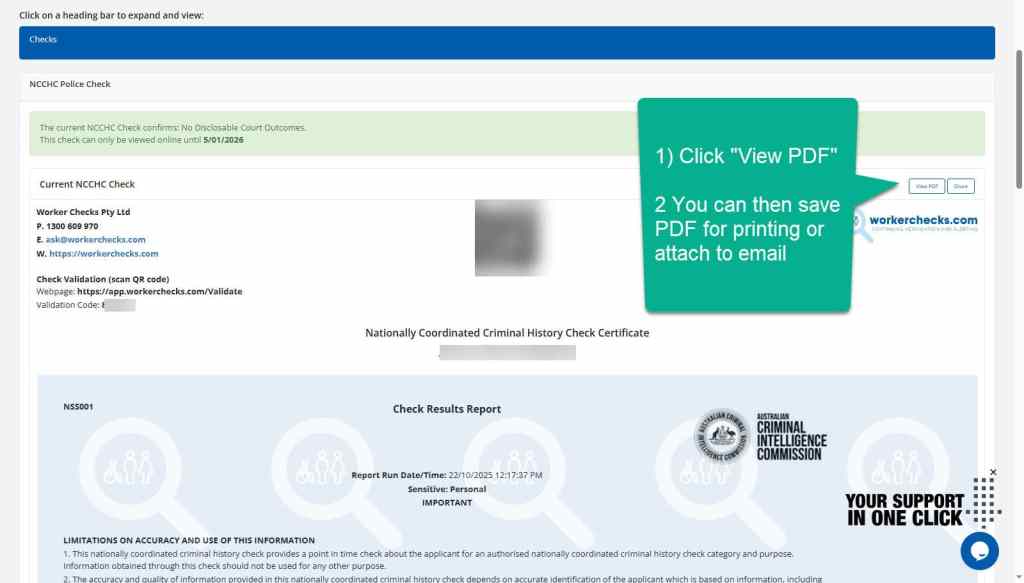
Your PDF version is identical to your official digital certificate and includes embedded validation features for authenticity.
💡 Tip: Printing directly from your Worker Checks portal ensures you capture the latest, verified version of your certificate.
🌐 How to E-Share Your Certificate #
In addition to printing, you can securely share your check electronically with an employer, agency, or other organisation.
- Click the Share icon (above the Print button).
- Enter the recipient’s email address.
- Worker Checks will send a secure verification link that allows the recipient to view your certificate online.
This e-Share method is preferred by many organisations as it allows instant validation through the Worker Checks verification system.
🛡️ Certificate Validation and Authenticity #
All Worker Checks certificates include a built-in validation feature so third parties can confirm authenticity at any time.
You can validate a printed or PDF Worker Checks certificate using one of two methods:
- QR Code Validation – Scan the QR code printed on the certificate to open a secure verification page.
- Certificate ID Search – Enter the unique certificate number on the Worker Checks Validation Portal to confirm status and authenticity.
👉 Validate a Worker Checks Certificate ›
Still Need Help? #
We’re happy to assist you in understanding your results and next steps.
Still Need Help? #
We’re happy to assist you in understanding your results and next steps.


 English (Australia)
  हिन्दी
  Tagalog
  Español de Colombia
  Français
  नेपाली
  简体中文
简体中文  Tiếng Việt