

Maaari ba akong makakuha ng printout ng aking sertipiko? #
How to print or download your certificate #
- Mag-log in sa iyong Worker Checks Check Hub.
- Under Your Checks & Products, click the tile for the check you want to view — for example, Nationally Coordinated Criminal History Check.
- I-click ang Tingnan ang PDF icon in the top-right corner of your certificate.
- Choose your printer, or select “Save as PDF” para mag-download ng digital copy.
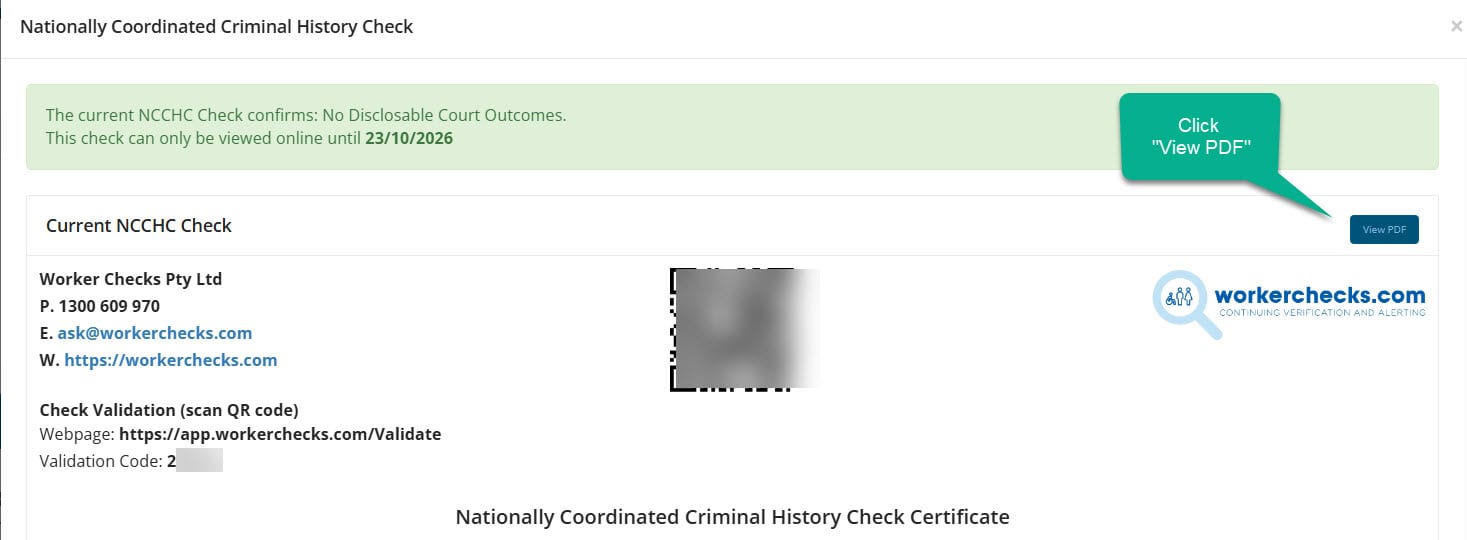
Ang iyong bersyon ng PDF ay kapareho ng iyong opisyal na digital na certificate at may kasamang mga naka-embed na feature ng pagpapatunay para sa pagiging tunay.
Tip: Printing directly from your Check Hub ensures you capture the latest, verified version of your certificate.
On a computer? Clicking Tingnan ang PDF opens or downloads the file depending on your browser’s settings. If it doesn’t open automatically, here’s where to check:
Most browsers also let you right-click the Tingnan ang PDF button and choose “Save link as…” to pick exactly where it saves.
On a mobile phone? Tapping Tingnan ang PDF downloads the file automatically rather than opening it on screen. If nothing seems to happen, here’s where to look:
Still can’t find it? Makipag-ugnayan sa amin and we’ll email the PDF to you directly.
Certificate validation and authenticity #
All Worker Checks certificates include a built-in validation feature so third parties can confirm authenticity at any time.
Pagpapatunay ng QR Code #
Scan the QR code printed on the certificate to open a secure verification page.
Paghahanap ng Certificate ID #
Enter the unique certificate number on the Worker Checks Validation Portal to confirm status and authenticity.
Kailangan mo pa ba ng tulong? #
Our team typically responds within one business day.


 English (Australia)
  हिन्दी
  Tagalog
  Español de Colombia
  Français
  नेपाली
  简体中文
简体中文  Tiếng Việt