

I’ve paid – what happens next? #
< 1 min na pagbabasa
You’ve paid for your check — great. The next step is to create your CheckHub account so you can complete your application. Payment on its own doesn’t start your check; you need to set up your account and complete a few quick steps first. Here’s exactly what to do.
Create your CheckHub account #
Go to the CheckHub login page and choose Create account (or Magrehistro). Sign up using the same mobile number you entered at checkout — this is what links your payment to your new account.
Open the CheckHub login page →
Tip: If you paid with one email or mobile (for example via Apple Pay or Google Pay) but registered with a different one, your payment may not link automatically. See Mga email na nagsasabing mayroon akong natitirang mga aksyon, ngunit hindi ko mahanap ang mga ito?
Log in and find your red Action button #
Once your account is created, log in. On your CheckHub dashboard you’ll see a red Action button next to your check. Click it to open your application.
If you don’t see anything to action, make sure you’re logged in with the same mobile number used at checkout.
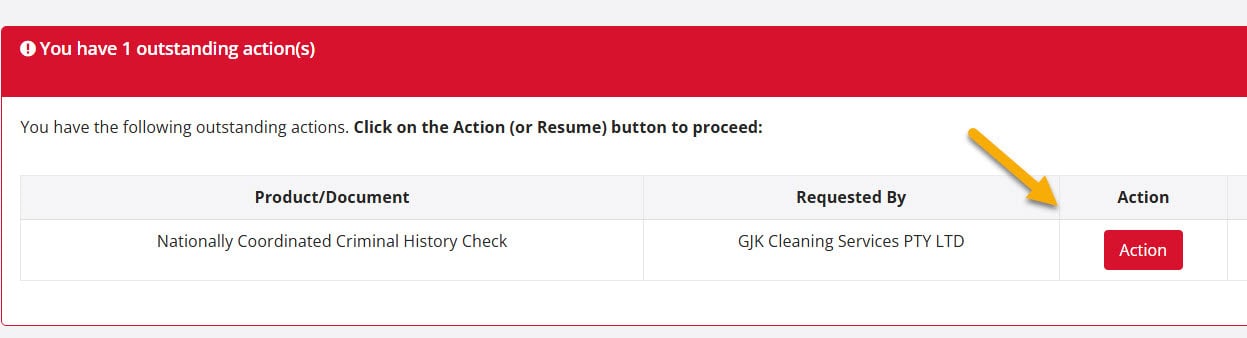
Kumpletuhin ang iyong aplikasyon #
The Action button takes you into your application, where you’ll select your identity documents and confirm a few details. From here, our step-by-step guide takes over:
How to start your Nationally Coordinated Criminal History Check →
Once you’ve completed identity verification, your check is submitted. 80% of checks are returned within 1–3 minutes. The remaining ~20% are referred to the ACIC for manual review and may take 1–15 business days.
Sa madaling salita: Pay → create your CheckHub account with your checkout mobile number → log in → click the red Action button → complete your application. That’s it.
Still stuck? Visit our Help Hub or call us on 1300 609 970 and we’ll walk you through it.


 English (Australia)
  हिन्दी
  Tagalog
  Español de Colombia
  Français
  नेपाली
  简体中文
简体中文  Tiếng Việt