

The Pre-Paid section in your Worker Checks Business Portal lets you purchase credits, view usage history, and monitor your organisation’s background-check activity in real time.
This feature is ideal for businesses that regularly conduct Police Checks, VEVO Checks, NDIS Screening, and other compliance checks for multiple workers.
💳 1️⃣ Purchasing Credits (Pre-Paid Option) #
If your organisation pays for worker checks, you’ll need to maintain a credit balance in your account.
✅ To Purchase Credits: #
- Log in to your Worker Checks Business Portal
- Go to the Pre-Paid tab
- Click Purchase Credits
- Enter the required number of credits
- Complete payment using a valid credit or debit card
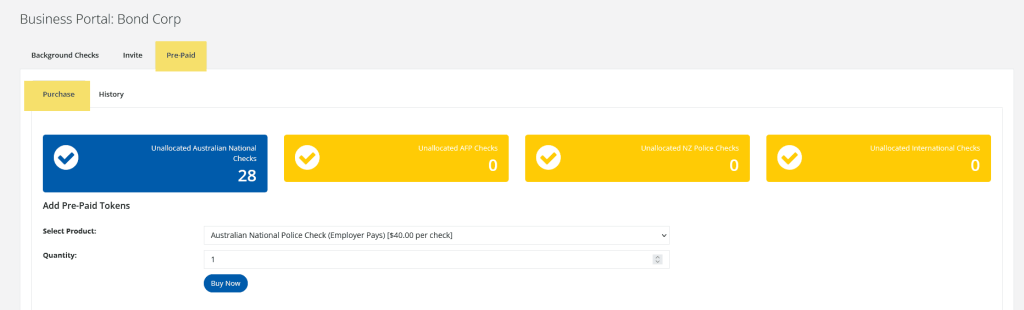
Credits are automatically applied to your account once payment is processed and can be used immediately to invite workers or conduct checks.
💡 Tip:
1 credit = 1 check (unless otherwise specified).
You can view remaining credits anytime in the Pre-Paid dashboard.
🧾 2️⃣ Account & Activity History #
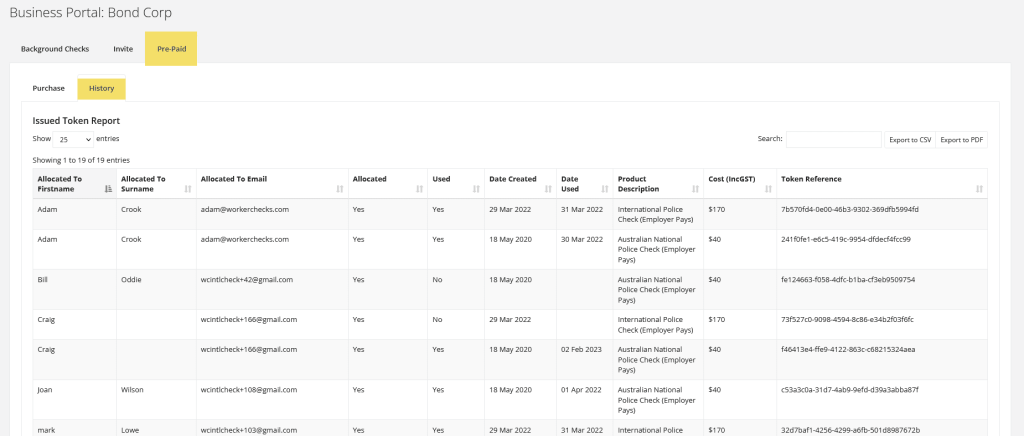
To view how credits are being used:
- Go to the Pre-Paid → History tab
- Review a detailed log of:
- Credits purchased
- Tokens used for individual checks
- Date and time of each transaction
- Type of check conducted (e.g. Police Check, VEVO, NDIS)
- Worker linked to each token
This provides full visibility into account usage and spending trends, making it easy to reconcile billing or monitor team activity.
🧮 3️⃣ High-Volume and Monthly Account Options #
If your organisation conducts more than 10 checks per month, you can request to move from Pre-Paid to a Monthly Invoicing Account.
This provides:
- Consolidated monthly billing
- 14 day payment terms
- Dedicated account manager
- Custom reporting and service-level agreements (SLA)
📧 Contact us at [email protected] to upgrade your account.
Still Need Help? #
We’re happy to assist you in understanding your results and next steps.


 English (Australia)
  हिन्दी
  Tagalog
  Español de Colombia
  Français
  नेपाली
  简体中文
简体中文  Tiếng Việt