
一旦您购买了 NCCHC 或收到雇主的邀请函,您需要访问您的 CheckHub - 您的个人 Worker Checks 门户 - 开始申请。请按照以下步骤开始申请。.
1
前往您的 CheckHub
导航至 app.workerchecks.com/account 在您的浏览器中。这是您的个人门户,您的所有支票都在这里进行管理。.
2
注册(首次用户)
如果您是第一次访问,请点击 “注册” 选项,然后创建账户。如果您已有账户,请直接登录。.

3
使用手机号码注册
注册时,请使用 与您在结账时提供的手机号码相同 (或您雇主存档的那张)。这样,您购买的支票就会与您的账户关联起来。.
⚠️ 重要: 使用不同的号码可能意味着您的支票不会出现在您的门户网站上。请联系我们,我们会为您链接。.
4
找到您的支票并点击操作按钮
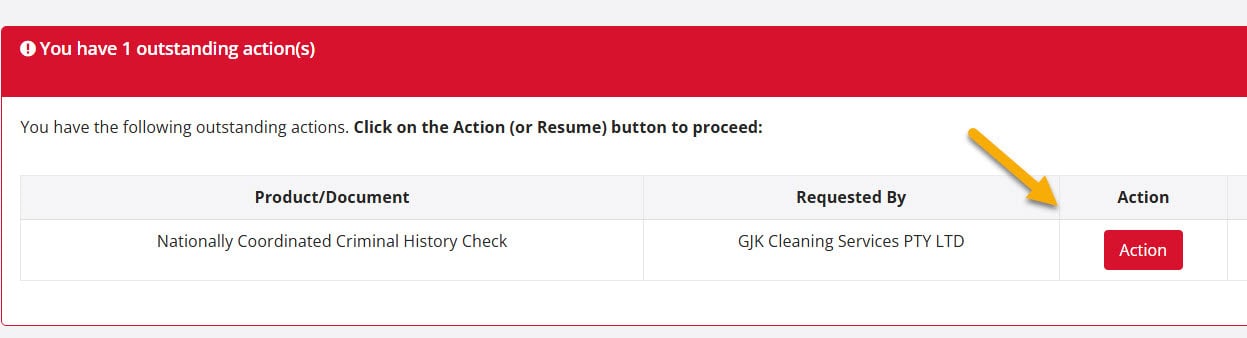
进入 CheckHub 后,在 “待执行的行动” 表,并点击 “行动” 右侧的按钮。您将在引导下完成以下操作
✓
移动设备上的生物识别身份验证✓
上传身份证件✓
确认个人详细信息✓
提交支票以供处理💾进度会自动保存--您可以在提交前随时返回。.
5
电子邮件和手机必须匹配
确保 电子邮件和手机号码 用于注册的支票与结账时或雇主提供的支票是否一致。如果不一致,您的支票可能不会出现在 "待执行 "中。.
需要帮助链接支票?请通过 聊天图标 或发送电子邮件 [email protected].
6
提交后
一旦提交,您的支票将转到 “待定” 标签。您将收到一封电子邮件确认,并可随时从您的 CheckHub 跟踪进度。.
Worker Checks 触点
如果通过业务邀请填写支票,请始终从 邀请函原件 - 这将确保您的检查自动链接到贵组织的仪表板。.
80% of NCCHCs are completed within 1-3 minutes
其余检查一般在一天内完成,但有些检查可能需要 10 天以上,这取决于州警察机构的处理时间。.
我们的支持团队可帮助您链接检查、解决登录问题或回答有关应用程序的问题。.


 English (Australia)
  हिन्दी
  Tagalog
  Español de Colombia
  Français
  नेपाली
  简体中文
简体中文  Tiếng Việt