< 1 min read
You've paid for your check — great. The next step is to create your CheckHub account so you can complete your application. Payment on its own doesn't start your check; you need to set up your account and complete a few quick steps first. Here's exactly what to do.
Create your CheckHub account
Go to the CheckHub login page and choose Create account (or Register). Sign up using the same mobile number that went through at checkout — this is what links your payment to your new account.
Open the CheckHub login page →
Paid with Apple Pay or Google Pay? Checkout uses the mobile number and email saved in your wallet — which may be an old number. Register with that number, not a newer one.
Log in and click your red Action button
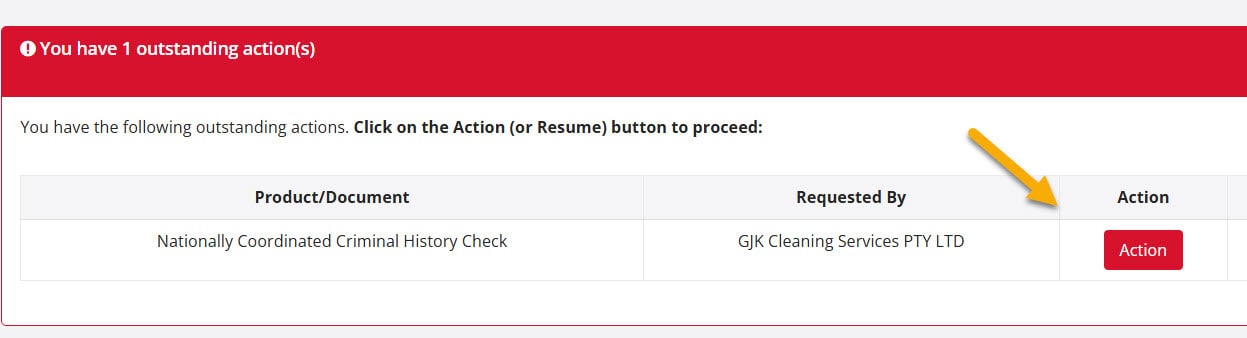
Once your account is created, log in. On your CheckHub dashboard, under Your Checks & Products, you'll see your check with a red Action button. Click it to open your application.
Logged in but can't see your check or the Action button?
Don't worry, and don't pay again — your payment has gone through, it just hasn't linked to your account. This almost always happens when you paid with Apple Pay or Google Pay and your wallet used a different mobile number or email from the one you registered with.
Our team can link it for you. Email [email protected] with:
- Your full name
- The mobile number you registered your CheckHub with
- Your email address
- Roughly when you paid, and whether you used Apple Pay or Google Pay
We'll link your check and reply by email — usually within 90 minutes during business hours (9am–5pm, Monday to Friday), or the next business day if you contact us after hours.
Start your application
The Action button opens a page called What you'll need before you apply, listing the ID documents you'll need. You don't need to choose your documents yet — scroll to the bottom and click Start application. We'll text a link to your mobile so you can take a selfie and photograph your ID. Then return to your application on the device you started on, check your details and submit.
Step-by-step guide to starting your application →
Once submitted, 80% of checks are returned within 1–3 minutes. The remaining ~20% are referred to the ACIC for manual review and may take longer, sometimes several weeks.
In short: Pay → create your CheckHub account with your checkout mobile number → log in → click the red Action button → start your application. Can't see your check? Email us — we'll link it for you.
Still stuck? Visit our Help Hub, email [email protected], or call us on 1300 609 970.